RadarURL

조회 수 4976 추천 수 0 댓글 0
?

단축키

Prev이전 문서

Next다음 문서

크게 작게 위로 아래로 댓글로 가기 인쇄 첨부
?

단축키

Prev이전 문서

Next다음 문서

크게 작게 위로 아래로 댓글로 가기 인쇄 첨부

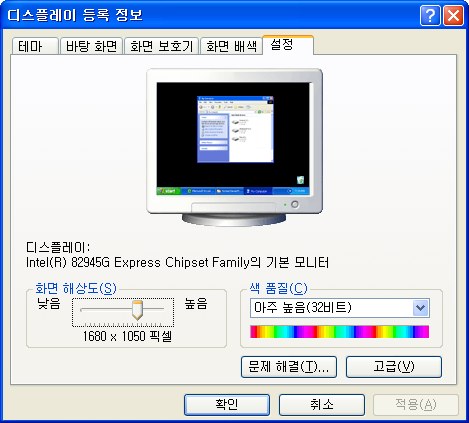
82945G를 사용하는 컴퓨터에 1440X900 또는 1680x1050해상도를 표준으로 하는 모니터를 교체했더니 지원하는 해상도가 나오지 않았다. 드라이버 소프트웨어 설치를 하면 된다고 하는데 그래도 해결이 되지 않는 경우가 있다. 이 경우 어쩔수 없지만 inf 드라이버 파일을 수정해야 한다. 수정하는 방법은 다음과 같은데 82945G을 기준으로 설명하겠다.


Step1 

For the 2nd Generation Intel® Core™ Processors with Intel® HD Graphics 3000/2000:
If you have a computer that has a 2nd Generation Intel® Core™ Processor with Intel® HD Graphics 3000/2000, click here for drivers that resolve this issue.

For the
 Intel® HD Graphics Chipset Families:
If you have a computer that has Intel® HD Graphics, click here for drivers that resolve this issue.

For the Intel® 4 Series Express Chipset Families:
If you have a computer that has the Intel® G41, G43, or G45 Express Chipset or the Mobile Intel® GL40, GM45, or GS45 Express Chipset, click here for drivers that resolve this issue.

For the Intel® 3 Series Express Chipset Families and the Mobile Intel® 965 Express Chipset Family:
If you have a computer that has the Intel® G31, G33, G35, Q33, Q35 Express Chipset or the Mobile Intel® 965 Express Chipset, click here for drivers that resolve this issue.

For the desktop Intel® 946 and 965 Express Chipset Families:
If you have a computer that has the Intel® 946GZ, G965, Q963, or Q965 Express Chipset, click here for drivers that resolve this issue.

For the desktop and Mobile Intel® 945 Express Chipset Families:
If you have a computer that has the Intel® 945G or 945GV Express Chipset or the Mobile Intel® 940GML, 943MGL, 945GM, or 945GMS Express Chipset, click here for drivers that resolve this issue.

자신에 맞는 드라이버를 찾는다.
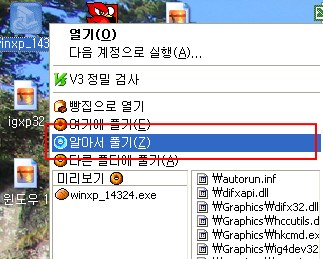

그리고 나서 설치파일을 압축프로그램으로 분해한다. 이후 아래의 파일을 연다.

winxp_14324\Graphics
igxp32

Step2

[NonEDIDMode_AddSwSettings] 부분을 찾는다. 찾으면 다음과 같은 부분이 나온다.


[NonEDIDMode_AddSwSettings]
HKR,, TotalDTDCount, %REG_DWORD%, 0   ; This shows number of DTDs to be used. ;  0-->Disable the feature.
;Following keys have 20 bytes (18 byte DTD + 2 Byte flags).
HKR,, DTD_1,%REG_BINARY%, 01,1D,80,18,71,1C,16,20,58,2C,1A,00,00,00,00,00,00,86,37,01 ;1920x1080@60...Interlaced
HKR,, DTD_2, %REG_BINARY%, 01,1D,80,D0,72,1C,16,20,10,2C,1A,80,00,00,00,00,00,86,37, 01 ;1920x1080@50...Interlaced
HKR,, DTD_3,%REG_BINARY%, 01,1D,00,BC,52,D0,1E,20,B8,28,25,40,00,00,00,00,00,04,37, 01 ;1280x720@50....Non-interlaced
HKR,, DTD_4, %REG_BINARY%, 01,1D,00,72,51,D0,1E,20,6E,28,25,00,00,00,00,00,00,06,37,01 ;1280x720@60....Non-interlaced
HKR,, DTD_5,%REG_BINARY%, 00, 00, 00 ,00, 00, 00,00, 00, 00,00, 00, 00,00, 00, 00,00, 00, 00,00, 00 ;Fifth DTD

굵은 부분이 수정할 부분이다.

Step3

맨 첫 부분

HKR,, TotalDTDCount, %REG_DWORD%, 0 ; This shows number of DTDs to be used. ; 0-->Disable the feature.

이것을

HKR,, TotalDTDCount, %REG_DWORD%, 5 ; This shows number of DTDs to be used. ; 0-->Disable the feature.

이렇게 수정한다.

Step4

HKR,, DTD_5,%REG_BINARY%, 00, 00, 00 ,00, 00, 00,00, 00, 00,00, 00, 00,00, 00, 00,00, 00, 00,00, 00 ;Fifth DTD

이 부분을 해상도에 따라서 다음과 같이 바꾼다.


 - 1440X900

HKR,, DTD_5,%REG_BINARY%, 97,29,A0,D0,51,84,20,30,50,98,13,00,00,00,00,00,00,1C,37,01 ;1440x900@60

 - 1680x1050

HKR,, DTD_5, %REG_BINARY%, 79,39,90,40,62,1A,25,40,68,B8,3,00,00,00,00,00,00,1C,27,00 ;1680x1050@60

이렇게 한다.

예시는 다음과 같다.

  - 1440X900

[NonEDIDMode_AddSwSettings]
HKR,, TotalDTDCount, %REG_DWORD%, 5 ; This shows number of DTDs to be used. ; 0-->Disable the feature.
;Following keys have 20 bytes (18 byte DTD + 2 Byte flags).
HKR,, DTD_1,%REG_BINARY%, 01,1D,80,18,71,1C,16,20,58,2C,1A,00,00,00,00,00,00,86,37,01 ;1920x1080@60...Interlaced
HKR,, DTD_2, %REG_BINARY%, 01,1D,80,D0,72,1C,16,20,10,2C,1A,80,00,00,00,00,00,86,37, 01 ;1920x1080@50...Interlaced
HKR,, DTD_3,%REG_BINARY%, 01,1D,00,BC,52,D0,1E,20,B8,28,25,40,00,00,00,00,00,04,37, 01 ;1280x720@50....Non-interlaced
HKR,, DTD_4, %REG_BINARY%, 01,1D,00,72,51,D0,1E,20,6E,28,25,00,00,00,00,00,00,06,37,01 ;1280x720@60....Non-interlaced
HKR,, DTD_5,%REG_BINARY%, 97,29,A0,D0,51,84,20,30,50,98,13,00,00,00,00,00,00,1C,37,01 ;1440x900@60

 - 1680x1050

[NonEDIDMode_AddSwSettings]
HKR,, TotalDTDCount, %REG_DWORD%, 5 ; This shows number of DTDs to be used. ; 0-->Disable the feature.
;Following keys have 20 bytes (18 byte DTD + 2 Byte flags).
HKR,, DTD_1,%REG_BINARY%, 01,1D,80,18,71,1C,16,20,58,2C,1A,00,00,00,00,00,00,86,37,01 ;1920x1080@60...Interlaced
HKR,, DTD_2, %REG_BINARY%, 01,1D,80,D0,72,1C,16,20,10,2C,1A,80,00,00,00,00,00,86,37, 01 ;1920x1080@50...Interlaced
HKR,, DTD_3,%REG_BINARY%, 01,1D,00,BC,52,D0,1E,20,B8,28,25,40,00,00,00,00,00,04,37, 01 ;1280x720@50....Non-interlaced
HKR,, DTD_4, %REG_BINARY%, 01,1D,00,72,51,D0,1E,20,6E,28,25,00,00,00,00,00,00,06,37,01 ;1280x720@60....Non-interlaced
HKR,, DTD_5, %REG_BINARY%, 79,39,90,40,62,1A,25,40,68,B8,3,00,00,00,00,00,00,1C,27,00 ;1680x1050@60


본 문서가 적용되는 그래픽카드와 칩셋은 아래와 같다고 한다.

Intel® 82945G Express Chipset 
Intel® 82946GZ Graphics Controller 
Intel® 82G965 Graphics and Memory Controller Hub (GMCH) 
Intel® 82Q963 Graphics and Memory Controller Hub (GMCH) 
Intel® 82Q965 Graphics and Memory Controller Hub (GMCH) 
Intel® G31 Express Chipset 
Intel® G33 Express Chipset 
Intel® G35 Express Chipset 
Intel® Q33 Express Chipset 
Intel® Q35 Express Chipset 
Mobile Intel® 945GM Express Chipset Family 
Mobile Intel® 965 Express Chipset Family  


윈도우~1.JPG


이렇게 하면 해상도가 생성되고 사용할 수 있다.


출처 : http://yurion.net/1971

?

공부 게시판

공부에 도움되는 글을 올려주세요.

  1. No Image notice by 처누 2003/08/18 by 처누
    Views 936036 

    [공지] 공부 게시판 입니다.

  2. 올바른 자위습관을 가져야 하는 이유

  3. 대한민국 결정사 직업 등급표

  4. 알아두면 유용한 향수 향 종류 모음

  5. 로그인 구글 드라이브 안 쓰고 시놀로지 드라이브 쓰는 이유, 설정 방법 & 활용팁

  6. SMB 다중 채널 관리

  7. Synology NAS SMB 3.0 Multichannel 이용하기

  8. 어떻게 SSH를 통해 root 권한으로 DSM/SRM에 로그인할 수 있습니까?

  9. 시놀로지 나스 SMB 3.0 멀티채널 구성하는법

  10. RWA(Real-World Assets): 실물자산 토큰화 이해

  11. 그루밍성범죄와 가스라이팅 차이점, 처벌 수위 알아보기

  12. 전문의가 추천하는 자위 횟수

  13. 일상에 쉽게 적용할 수 있는 수면 관리 앱 5가지

  14. 매일 밤에 머리 감으면 일어나는 일ㅣ탈모 전문가가 알려주는 충격적인 진실ㅣ김주용 원장 1편ㅣ닥터딩요

  15. 다친 손가락에 끼우는 실리콘 손가락

  16. 성적 취향에 대하여...

  17. fwb(Friends with Benefits)에 대해

  18. 자위가 잠자는 데 도움이됩니까? 알아봅시다!

  19. 야동 실태보고서

  20. 불면증 해결을 위한 자위 활용

  21. 변호사가 보아온 상간남들의 공통점

Board Pagination Prev 1 2 3 4 5 6 7 8 9 10 ... 127 Next
/ 127


즐겨찾기 (가족)

JAESOO's HOMEPAGE


YOUNGAE's HOMEPAGE


장여은 홈페이지


장여희 홈페이지


장여원 홈페이지


즐겨찾기 (업무)

알리카페 홀릭

숭실대 컴퓨터 통신연구실 (서창진)

말레이시아 KL Sentral 한국인 GuestHouse


즐겨찾기 (취미)

어드민아이디

유에코 사랑회

아스가르드 좋은사람/나쁜사람

JServer.kr

제이서버 메타블로그

재수 티스토리


즐겨찾기 (강의, 커뮤니티)

재수 강의 홈페이지


한소리


VTMODE.COM


숭실대 인공지능학과


숭실대 통신연구실


베너