

안녕하세요? 노란곰님 신랑 정반짝이 입니다.
오늘은 Synology 시놀로지 NAS 특집으로 포스팅을 해봅니다.
주제 : Synology SMB 3.0 Multichannel 을 이용한 네트워크 전송속도 높이기
요약 : Synology 에서 smb.conf 수정으로 Multichannel 기능을 이용하여, NAS-PC 간의 파일 전송속도를 높이고자 함
환경 :
- NAS : Synology DS1815+ (WD Red 4TB Disk 6EA + Crucial 525GB 2EA (Cache) / RAID-5 구성
- PC : ASrock 내장 Dual LAN (Brocade) + Intel PT Dual LAN Card (MS Windows 10 Professional)
- Network : NETGEAR GS724T v3 (1Gbps x 24port Switch)
- Connection : DS1815+ <-> Switch <-> PC 모두 1Gbps Quad Port (4-port) 연결
개요 : 시놀로지 DSM 6.1 현재 SMB 3.0을 지원하지만 핵심 기능인 Multichannel은 지원하지 않습니다. SMB 3.0의 Multichannel은 Dual port 이상으로 Deivce간 연결 상태일 때, 모든 포트를 사용해서 데이터를 전송하는 것을 뜻 합니다. 즉 1Gbps로 연결 되어 있는 케이블이 2가닥 이라면, Multichannel 환경에서는 2Gbps 의 속도로 데이터를 전송하게 됩니다.
그러나 시놀로지 Synology NAS에서는 DSM 6.1-15047 (Update2) 이 최신인 지금 시점 (2017년 3월 27일) 에도 Multichannel을 지원하지 않습니다. 그러나, /ete/samba/smb.conf 에 특정 문구를 넣어주면, Multichannel 사용이 가능 합니다.
방법 : 요약하자면, Synology에 SSH 로 접속한 후, /etc/samba/smb.conf 파일을 수정해 줍니다.
- 1. putty를 이용해 synology 에 접속을 합니다. (putty 다운로드는 구글에서 검색하면 바로 나옵니다)
- 2. sudo -i 실행 (root 권한으로 id를 변경. 비밀번호는 admin 비밀번호랑 동일)
- 3. vi /etc/samba/smb.conf 실행
- 4. 아래 내용 추가
server multi channel support = yes
aio read size = 1
aio write size = 1
- 5. 저장하고 나와서 NAS 재부팅 (samba 관련 서비스만 재시작 해도 됩니다)
결과 :
- 적용 전 : PC에서 Quad port (4-port) 로 Switch에 연결 되어 있음에도 110MB/s (1Gbps) 로 파일 복사 (NAS > PC)
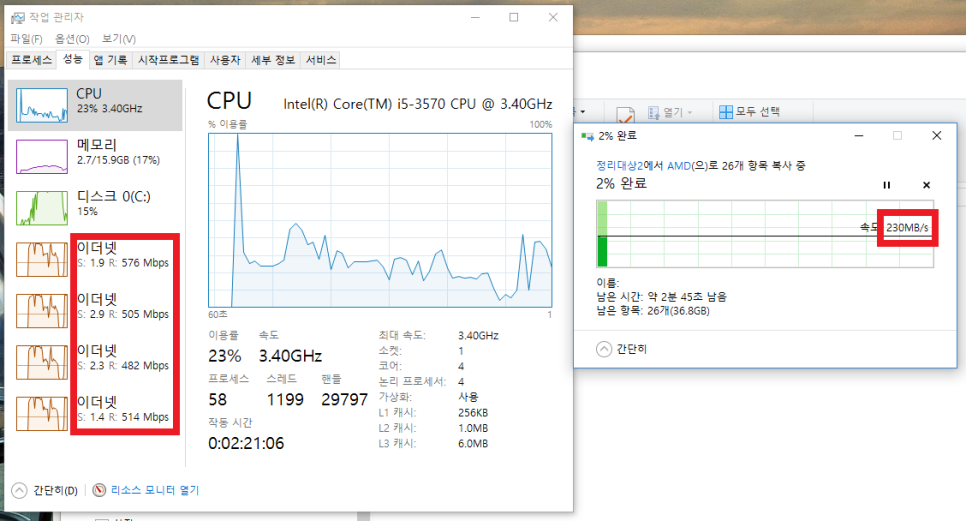
- 적용 후 : PC에서 220MB/s 로 파일 복사 (NAS > PC)
Quad Port임에도 220MB/s 밖에 안 되는 이유는, PC의 SSD가 Write 성능에서 병목이 걸리기 때문입니다. Synology DS1815+ NAS는 Spec상 최대 Read&Write 400MB/s에 근접하는 속도를 RAID-5에서 제공하므로, 병목이 NAS에서 걸렸을 것으로 생각하지는 않습니다.
아래 스크린샷을 보면, 4개 Port에서 각각 500Mbps 전후로 트래픽을 나눠서 전송하는 것을 볼 수 있습니다.
주의 : Production (백업시스템이 아닌 메인 저장소로 사용하는 NAS) 의 경우, 적용을 권장하지 않습니다. 어디까지나 꼼수일 뿐, Synology에서 SMB 4.4를 곧 DSM에 적용할 것으로 보이니 그 때까지 기다려 보는 걸 권장합니다. 위 내용을 적용함으로 인해 생기는 Data의 Corruption 및 오염에 대해서는 Synology에 책임을 물을 수 없습니다. 적용하는 사람 자신이 책임져야 합니다.
추가 설명 :
- aio read size (S) 옵션 설명 : If Samba has been built with asynchronous I/O support and this integer parameter is set to non-zero value, Samba will read from file asynchronously when size of request is bigger than this value. Note that it happens only for non-chained and non-chaining reads and when not using write cache.
Current implementation of asynchronous I/O in Samba 3.0 does support only up to 10 outstanding asynchronous requests, read and write combined.
Related command: write cache size
Related command: aio write size
Default: aio read size = 0
- aio write size (S) 옵션 설명 : If Samba has been built with asynchronous I/O support and this integer parameter is set to non-zero value, Samba will write to file asynchronously when size of request is bigger than this value. Note that it happens only for non-chained and non-chaining reads and when not using write cache.
Current implementation of asynchronous I/O in Samba 3.0 does support only up to 10 outstanding asynchronous requests, read and write combined.
Related command: write cache size
Related command: aio read size
Default: aio write size = 0
옵션 정보에 대한 출처 : https://www.samba.org/samba/docs/man/manpages-3/smb.conf.5.html
궁금하신 사항은 댓글 달아 주세요
출처 : https://blog.naver.com/vicki1003/220967821876

 어떻게 SSH를 통해 root 권한으로 DSM/SRM에 로그인할 수 있습니까?


