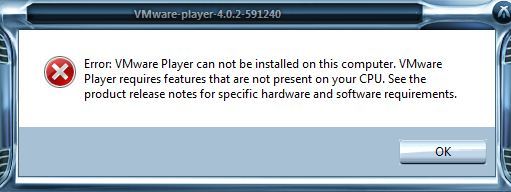
Atom 계열의 컴퓨터에 VMware를 설치하다가 다음과 같은 오류가 나는 경우가 있다.

VMware can not installed. VMware requires feature that are not present on your CPU..
무언가 CPU에서 지원을 해주지 못해서 설치가 불가능하다는 얘기이다.
VMware에서 요구하는 CPU 특성은
Supported Processors
The host system must have a 64-bit x86 CPU that meets the following requirements.
|
■ |
LAHF/SAHF support in long mode
|
|
■ |
1.3GHz or faster core speed
|
Multiprocessor systems are supported.
When you install Workstation, the installer performs checks to make sure the host system has a supported processor. You cannot install Workstation if the host system does not meet the processor requirements.
Processor Requirements for 64-Bit Guest Operating Systems
The operating system that runs inside a virtual machine is called the guest operating system. To run 64-bit guest operating systems, the host system must have one of the following processors.
|
■ |
An AMD CPU that has segment-limit support in long mode
|
|
■ |
An Intel CPU that has VT-x support
|
위와 같다.
위의 내용을 요약하면
CPU가 64-Bit를 지원하여야하고 VT-x 를 지원해야 한다.
지원 여부는 CPU-Z와 같은 CPU 정보확인 프로그램을 사용하면 된다.
cpu-z_1.61-32bits-en.zip
정보에서 EM64T (Intel) 또는 AMD64 (AMD)와 VT-x 가 보이면 지원하는것이다.
관련 질문과 답글도 찾을 수 있다.
-----------------------------------------------------------------------------------------------------------------------------------------------------------------------------------------------------------------
http://www.howtogeek.com/forum/topic/vmware-giving-error-message-while-installing
I downloaded latest built of VMware Player 4.0.2 and while installing,
Error: VMware Player can not be installed on this computer. VMware Player
requires features that are nor present on your CPU. See the
product release notes for specific hardware and software requirements.
Reports: · Posted 7 months ago
#
This post has been reported.
Installation Requirements
When you install Workstation, the installer performs checks to make sure the host system has a processor that meets the following requirements. You cannot install Workstation if the host system does not meet these requirements.
64-bit x86 CPU
LAHF/SAHF support in long mode
You can use CPU-Z or a similar utility to determine if the host system CPU is 64-bit capable. CPU-Z shows EM64T (Intel) or AMD64 (AMD) if the processor is 64-bit capable.
If you plan to install a 64-bit guest operating system in a virtual machine, the host system must have one of the following processors. Workstation will not allow you to install a 64-bit guest operating system if the host system does not have one of these processors.
AMD CPU that has segment-limit support in long mode.
Intel CPU that has VT-x support. VT-x support must be enabled in the host system BIOS. The BIOS settings that must be enabled for VT-x support vary depending on the system vendor. See VMware KB article 1003944 for information on how to determine if VT-x support is enabled.
-----------------------------------------------------------------------------------------------------------------------------------------------------------------------------------------------------------------
위와 같은 문제가 아니라면 다음과 같은 문제가 있을 수 있다.
CMOS의 CPU 설정중 "No-Execute Memory Protection" 이라는 부분이 활성화된 경우에도
VMWare가 설치가 되지 않는다.
메모리 영역에서 악성코드가 실행되지 못하도록 막는 기능인데
VMWare의 기능을 악성코드로 간주하게 된다.
관련 질답은 다음에서 확인할 수 있다.
-----------------------------------------------------------------------------------------------------------------------------------------------------------------------------------------------------------------
http://communities.vmware.com/thread/120655
Jan 10, 2008 1:17 AM
"No-Execute Memory Protection" BIOS settinghi guys!
while BIOS-upgrading our blade center (HP BL460c blades) i realized that the "No-Execute Memory Protection" setting was turned off everywhere. google, however, told me that turning on this setting would be a clever thing to do. the only problem is changing this BIOS setting results in our esx servers (3.5.0 / 64607; Infrastructure Center 2.5) complaining that the CPU is now different than it was at the point the VMs were created, and thus won't vmotion them. this kinda sucks because i don't really want to mess around with CPUID masks.
any ideas how to get around this? is there an easy hack to make the VMs vmotion again? or just leave the setting as it was, turned off?
thanks in advance,
Tom
EDIT: shutting down the guests, moving them to an different esx server with "No-Execute Memory Protection" turned on, starting them there, enables me to vmotion them between those servers which also have this setting turned on. weird...
Re: "No-Execute Memory Protection" BIOS setting
Hiya,
You can set a cpu mask on your VMs so that these type of cpu incompatibilities are ignored in the pre-vmotion checks
In the VI client, rt click on the VM, edit settings, select the "options" tab, click on advanced, then look in the CPU Identification Mask
You can just mask the NX flag - or you can mask other advanced features (search the vmtn forums and/or google for more info)
Dinny
Report Abuse
Re: "No-Execute Memory Protection" BIOS setting
thanks for your response!
i found out that shuting down the gues OS, then the ESX server itself, then enabling the BIOS setting and starting up again does the trick. no CPUID mask needed.
-Tom
Re: "No-Execute Memory Protection" BIOS setting
That's OK if all your hardware supports the same cpu settings - obviously if they are all the same - then there are no compatabilities to mask.
If some ESX hardware supports some cpu functionality, and some doesn't - that is when you do need to mask out the incompatabilities
Dinny
-----------------------------------------------------------------------------------------------------------------------------------------------------------------------------------------------------------------
내 메인모드는 현재 AD2700-ITX인데
'No-Excute Memory Protection' 기능이 있다.
이 부분을 비활성화 시키면 VMWare의 설치가 가능하다.
도움이 되었기를..


